Contents
Site Overview
Oregon's most comprehensive therapist directory with 8,000+ licensed providers.
Smart Search
Name, specialty, city, condition, zip code — with real-time autocomplete and synonym expansion.
OHP & Medicaid
Dedicated filtering for Oregon Health Plan, Medicaid, and all CCO plans (Trillium, CareOregon, EOCCO, etc.).
AI Matching
7-step intake quiz matches clients with the most relevant therapists based on concerns, preferences, and location.
Location-Aware
Search by city, zip code, or GPS coordinates with radius filtering (5–100 miles). Covers all Oregon cities.
Verified Profiles
Manually verified credentials. Verified providers show a trust badge and rank higher in search results.
iOS App
Native SwiftUI companion app for browsing, searching, and saving favorite providers on the go.
Searching for Therapists
The homepage search bar supports free-text queries across names, specialties, cities, conditions, and more.
How Search Works
The search engine uses PostgreSQL full-text search (tsvector/tsquery) combined with ILIKE fallbacks. It supports:
- Prefix matching — typing "anx" will match "Anxiety"
- Synonym expansion — "couples" matches "Marriage Counseling," "Relationship," "Gottman"
- Psychedelic detection — searching "ketamine" or "psilocybin" automatically includes alternative providers
- Word-boundary matching — "Eric" won't falsely match "American" or "generic"
Search Result Ranking
Results are ranked using a multi-layer sorting algorithm:
Featured & Standout Providers
Admin-designated featured and standout profiles always appear first, randomized within their group.
Subscription Tier
Pro (rank 4) → Growth (rank 3) → Verified Free (rank 2) → Has Content (rank 1) → Shadow/Empty (rank 0).
Profile Completeness
Bio quality, photo, phone, specialties, insurance, modalities, languages, and website all contribute to a completeness score.
Referral Network Count
Providers with more peer recommendations rank higher within the same tier.
Individual vs. Group
Individual practitioners rank above group practice entries as a tiebreaker.
Advanced Filters
17+ filters to narrow down exactly the right therapist.
Provider Profiles
Each provider gets a clean, SEO-optimized profile page at
/provider/your-name-city.
Profile Content
Name, credentials, photo, bio, specialties, modalities, insurance panels, languages, faith, pricing, and contact info.
Video & Links
Embed a "Vibe Check" intro video (YouTube/Vimeo). Add custom links, social profiles, and booking URLs.
Referral Network
See which providers recommend each other. Mutual referrals build trust and professional credibility.
Contact Modal
Clients can send a message directly through the profile without needing to leave the site.
Custom Pages
Paid providers can create custom content pages with a WYSIWYG editor — viewable directly on their profile.
JSON-LD Markup
Every profile includes structured data for rich Google search results — MedicalBusiness schema with location, services, and pricing.
Subscription Tiers
Three plans designed for different practice sizes. Monthly or annual billing via Stripe.
| Feature | Free $0 |
Growth $10/mo |
Pro $25/mo |
|---|---|---|---|
| Basic Listing | ✓ | ✓ | ✓ |
| Website Link | ✓ | ✓ | ✓ |
| Profile Photo | Blurred | ✓ | ✓ |
| Contact Info Displayed | ✕ | ✓ | ✓ |
| Verified Badge | ✕ | ✓ | ✓ |
| Booking URL & Social Links | ✕ | ✓ | ✓ |
| Search Priority | Lowest | Medium | Highest |
| Match Quiz Leads | Anonymized | 3/week | Unlimited |
| Lead Claiming | ✕ | 3/week | Unlimited |
| Lead Email Content | Masked | Full Contact | Full Contact |
| "Featured" Badge | ✕ | ✕ | ✓ |
| "PRO" Crown Badge | ✕ | ✕ | ✓ |
| Featured in Guides | ✕ | ✓ | ✓ (first) |
| DoFollow Backlink (SEO) | ✕ | ✕ | ✓ |
| Stripe Billing Portal | ✕ | ✓ | ✓ |
Annual Pricing
Growth Annual: $100/year ($8.33/mo — 2 months free)
Pro Annual: $250/year ($20.83/mo — 2 months free)
SEO & Visibility
How the directory boosts your online presence and Google rankings.
Search Priority
Pro and Growth providers appear above free listings. The algorithm prioritizes subscription tier, then profile completeness, then peer referrals.
DoFollow Backlinks
Pro only: Your website gets a direct dofollow hyperlink, passing domain authority to your private practice site — a major SEO signal.
Keyword-Rich Profiles
Your profile is a fully optimized landing page at /provider/your-name — ranking
organically for "Therapist in [City]" searches.
JSON-LD Schema
MedicalBusiness structured data helps Google show rich results with your name, credentials, location, and services.
Dynamic Sitemap
Auto-generated XML sitemap (/sitemap.xml) with all provider profiles, updated
automatically as the directory grows.
Open Graph Tags
Every profile generates rich social previews with custom OG images for sharing on Facebook, LinkedIn, and Twitter.
Provider Dashboard
Your command center for managing your practice's online presence.
Profile Editor
Edit bio, credentials, specialties, modalities, insurance, contact info, profile photo, and more — with auto-save.
Lead Management
View, claim, and manage incoming patient leads from the Match Quiz. See contact details (paid tiers) or anonymized info (free).
Content Manager
Add custom links, video embeds, and WYSIWYG pages. Drag-and-drop reordering. Toggle visibility with one click.
Billing & Subscription
Upgrade, downgrade, or cancel your plan. Manage billing through Stripe's secure portal.
Account Security
Change password, manage email. CSRF protection on all forms. Session-based rate limiting.
Referral Network
Favorite other providers to build mutual referral relationships. See who recommends you.
Match Quiz
A guided 7-step intake wizard that connects clients with the right therapist.
What Brings You to Therapy?
Select from 15+ concerns: Anxiety, Depression, Trauma/PTSD, Couples, Grief, Addiction, ADHD, Family, OCD, Eating/Body Image, and more.
Therapy Preferences
Choose your preferred therapy style: talk therapy, structured/CBT, creative/art, body-based, faith-integrated, or no preference.
Therapist Gender Preference
Select your preferred therapist gender: Male, Female, Non-Binary, or no preference.
Insurance & Budget
Select your insurance plan or indicate OHP/Medicaid, sliding scale, or self-pay.
Location & Format
Enter your city or zip code. Choose telehealth, in-person, or either.
Additional Preferences
Language, faith-based counseling, and any other important factors.
Contact Info & Submit
Enter your name, email, and optional phone. The system matches you with relevant providers and notifies them.
Claiming a Profile
Most providers already have a "shadow" profile from public records. Claim yours to take control.
Search for Your Name
Visit the homepage and search for your name or practice. Shadow profiles have a "Claim" button.
Verify Your Email
Enter your professional email and create a password. The admin (Eric) will manually verify your credentials.
Complete Your Profile
Add your bio, photo, specialties, insurance, and contact details. More complete profiles rank higher.
Choose a Plan (Optional)
Free works fine for a basic listing. Upgrade to Growth or Pro for leads, verified badge, and priority ranking.
Group Practices & Clinics
Manage your entire practice, monitor leads, and upgrade your staff under one unified dashboard.
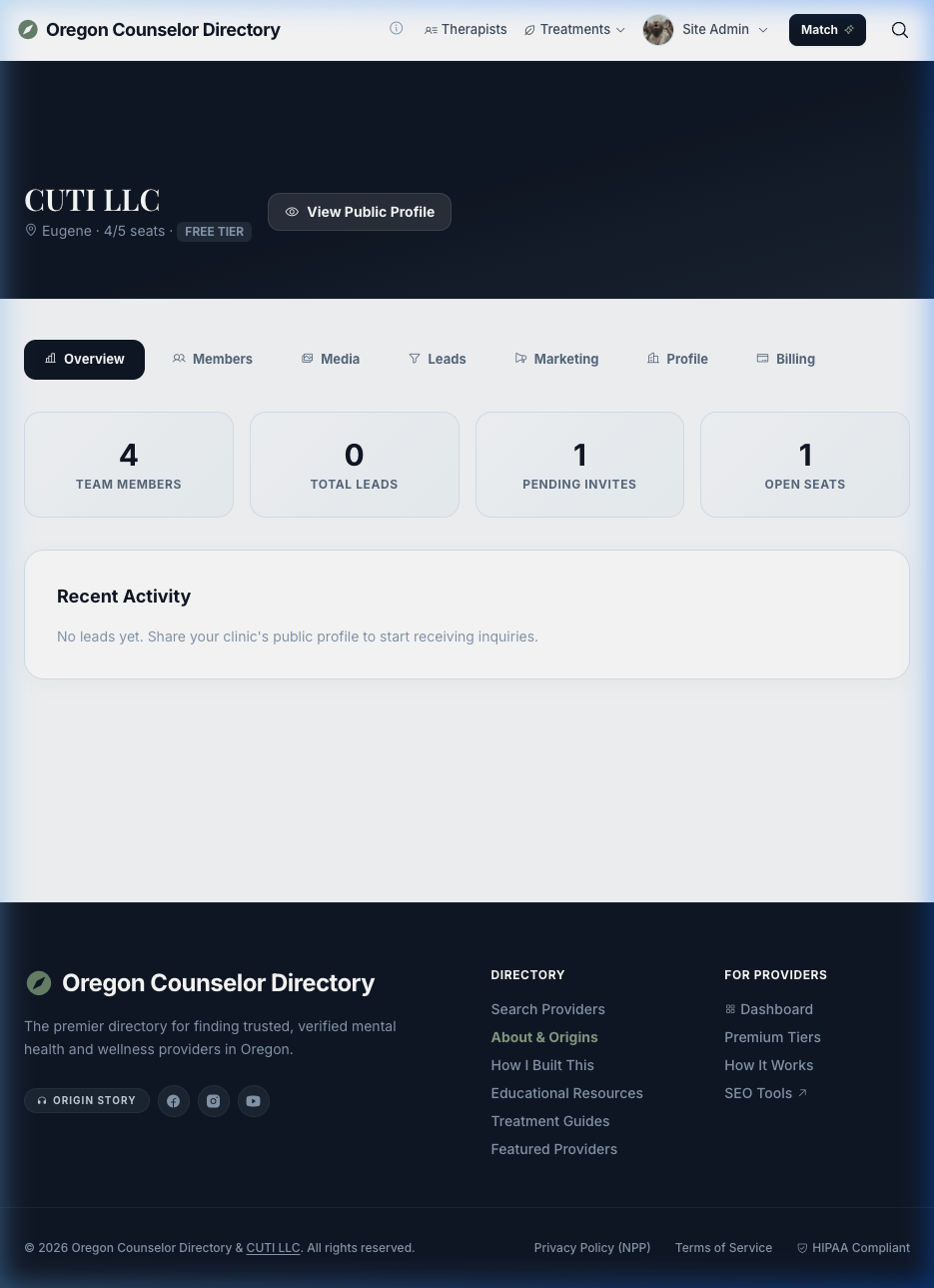
The 7-Tab Admin Toolkit
As a Clinic Administrator, your dashboard gives you total control over how your practice appears in the Directory.
1. Overview
Get a quick pulse on your clinic's health: total team members, open seats remaining on your current subscription tier, pending invitations, and recent lead activity.
2. Members
Send email invitations to bring therapists under your clinic's umbrella. You can optionally grant them Admin rights or remove them if they leave the practice. Included members inherit your clinic's subscription tier.
3. Media
Upload a clinic logo and manage your Photo Gallery. The photo gallery uses drag-and-drop ordering and supports large files, automatically creating an Apple-like Swiper.js slideshow on your public profile.
4. Leads
A centralized repository of all Match Quiz inquiries directed at your clinic as a whole.
5. Marketing
Create dedicated Custom Pages (e.g., "Ketamine Therapy at CUTI LLC" or "Our Approach to Gottman Method"). You can also purchase targeted Billboards to advertise on specific Oregon city search pages.
6. Profile
Edit your clinic's public narrative, define your granular office hours, set contact information, and embed an overarching intro video.
7. Billing
Manage your Clinic's subscription tier. Upgrading your Clinic tier automatically cascades premium Search Priority and verified benefits down to every member you've invited, saving you money compared to individual subscriptions.
Clinic Profile
Branded clinic page at /clinic/your-slug with logo, description, members list,
photos, and contact info.
Member Management
Invite providers via email, manage roles (admin vs. member), and optionally edit their profiles.
Tier Inheritance
Clinic's subscription tier flows down to all members. A Clinic Pro plan gives every member Pro-level features.
Billboard Ads
Target specific keywords and cities for billboard-style ads on search pages and city landing pages.
Media Gallery
Upload photos and videos of your clinic spaces, team, and events.
Custom Pages
Create marketing landing pages for specific services or conditions, hosted directly on your clinic profile.
iOS App
Browse and search the directory on the go.
Native SwiftUI App
The companion iOS app lets you search the full directory, view provider profiles, save favorites, and manage your dashboard — all from your iPhone. It communicates with the same backend API for real-time data.
Frequently Asked Questions
Do you take a percentage of my bookings?
No. There are no commissions. You pay a flat monthly subscription fee, and all bookings go directly to you.
How does the "Verified Badge" work?
Once you choose a paid tier, the admin (Eric, LPC) manually verifies your license/certification. The badge then appears on your profile.
Can I cancel anytime?
Yes. Subscriptions are billed through Stripe. You can downgrade or cancel anytime from your dashboard — no questions asked.
I can't find my profile. What do I do?
Shadow profiles are created from public records. If yours isn't there, register at /join
and the admin will review your application.
How do I remove my profile?
Visit your profile page, click "Request Removal," fill out the form with your name and reason, and solve the CAPTCHA. The admin will review and process the request.